Showing posts with label programming. Show all posts

Thursday, October 16, 2008

How To Set Up Your Windows PC for OpenGL Programming

These instructions will walk you through the process of setting up a programming environment for creation of 3D programs using OpenGL. In this case, we will be using Microsoft Visual C++ 2008 Express Edition running on a Windows XP system.


Instructions

  1. Download the Microsoft Visual C++ 2008 installer at http://www.microsoft.com/express/download/#webInstall
  2. Run the installer and follow the instructions included. (You do not need to install the optional SQL Server 2008 Express).
  3. Download the OpenGL utility toolkit from http://www.xmission.com/~nate/glut.html
  4. Extract files from the glut-#.#.#-bin.zip file to a folder on your desktop. (If you do not have an archiver, 7-zip is a good free software package for creating and unzipping archives.)
  5. Move the file glut.dll into the directory C:/WINDOWS/system32/
  6. Move the file glut.h into the include directory for Visual Studio 2008. C:/Program Files/Microsoft Visual Studio/VC/include/GL/. (You may need to create the GL folder).
  7. Move the file glut.lib into the lib directory for Visual Studio 2008. C:/Program Files/Microsoft Visual Studio/VC/lib/.
  8. In your source code, include glut.h with the preprocessor code: #include "glut.h"


Troubleshooting

If you receive linker errors during compilation, take the following steps:

  1. Add glut.lib to your additional dependencies. Navigate the menus as follows: Project->Properties->Configuration Properties->Linker->Input.
  2. Enter the text glut.lib into the line labeled "Additional Dependencies."
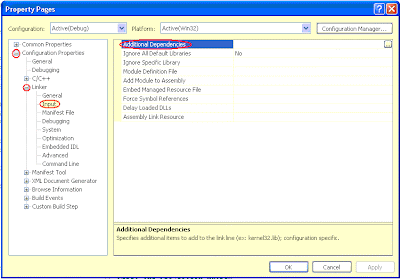
  3. Add glut.h to your additional include directories. Navigate the menus as follows: Project->Properties->Configuration Properties->Linker->Input.
  4. Click the ellipses button on the right hand side of the text field labeled "Additional Include Directories" and locate the glut.h file you downloaded in steps 3 and 4 of setup.

Wednesday, October 1, 2008

Game Programming

The word "game" makes people think of something that is fun and easy, something you don't really have to put any effort into, something you can just do to relax. When coupled with the word "programming," however, things become a whole different story.

I said in my welcome post that I've been scripting and programming since 2003, which is something of a lie, since during the last year and a half I haven't done much of either in my free time, since all my programming effort has been focused on school.

This semester, though, I am taking a Software Engineering class that provides a perfect excuse to break out an old project and make myself finish it. This will be my third attempt to break into the world of 3D graphics programming, complete with all the vector algebra and matrix transformations that 3D visualization is based on.

For this try, I've decided to go back to OpenGL, after having a pretty pleasant experience with DirectX, but running into a few too many derisive comments from hip UNIX users. (In case you were wondering, yes, Microsoft is the devil.) Both libraries seem fairly intuitive, so it's really not an issue.